Lanes for characters, plotlines and places
Give each point-of-view character, subplot or location its own lane. Scenes sit side by side, so you can see at a glance who is busy in chapter twelve and whose storyline has gone quiet for too long.
Storymapper lays your story out like a Gantt chart: one lane for each character, plotline or place, and one card for each scene. You see what happens, to whom, and in what order, on a single screen.
Free forever for the core features. No card needed.
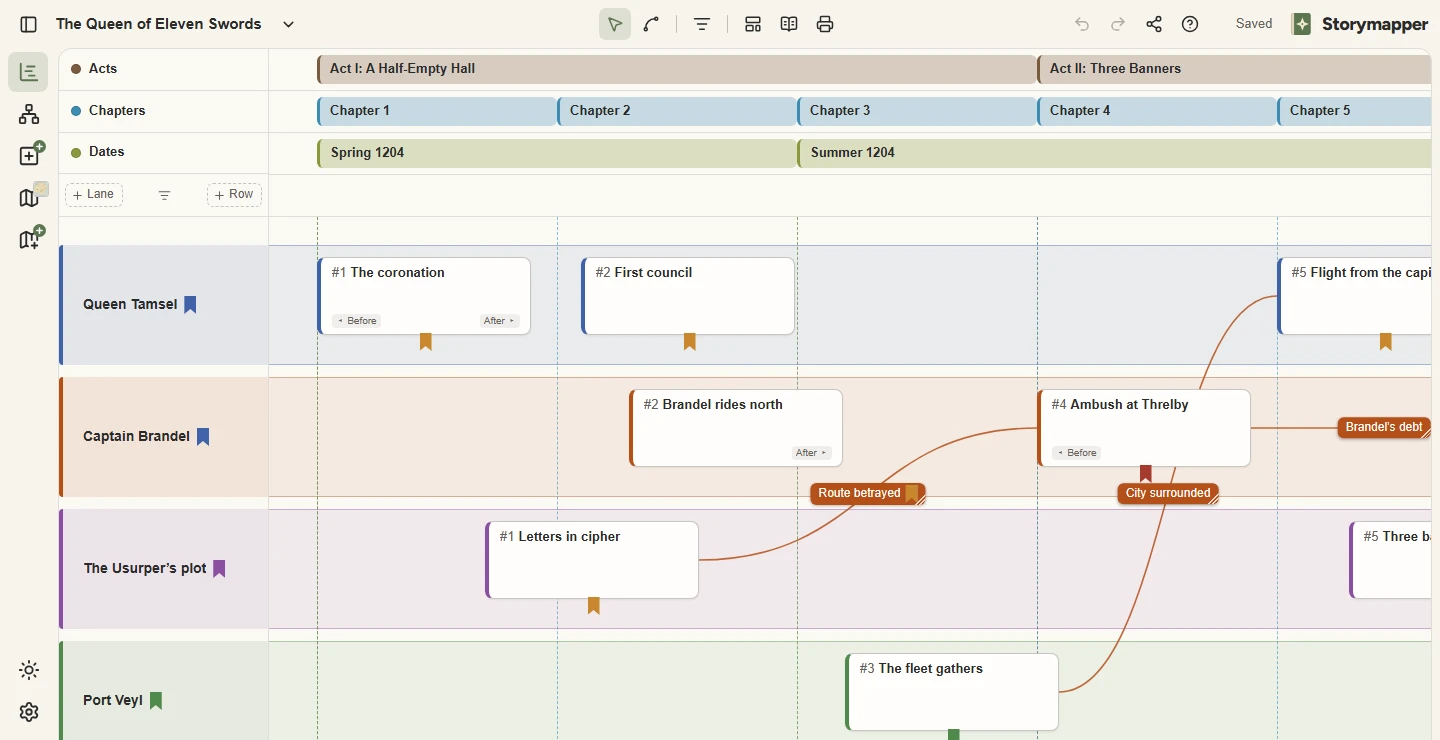
Give each point-of-view character, subplot or location its own lane. Scenes sit side by side, so you can see at a glance who is busy in chapter twelve and whose storyline has gone quiet for too long.
Stack rows of headers above the lanes: acts, parts, chapters, in-world dates, sessions or anything else you count by. A header can cover one scene or run across a whole act.
Draw a connector from one scene to another and give it a label. A betrayal in one lane points to its consequence in another, so plot holes show up as missing links instead of surprises in the third draft.
Every scene can carry a short note on the situation before it and the situation after it. Reading those notes in order is a quick continuity check on a character arc.
Add the three-act structure, the Hero’s Journey, a fifteen-beat sheet or four other structures as a row of beats across your story. Drag each beat to fit, and see at once which scenes carry it.
Switch the timeline to chapter order to see the story as the reader meets it, with every flashback where it is told. Print the whole timeline on one sheet or save it as a PDF, and send a read-only link to an editor or co-writer.