Plottr vs Aeon Timeline vs Campfire vs World Anvil, and how Storymapper compares
I built Storymapper because my story plans had outgrown an Excel Gantt chart. Before building it, I tried the tools that were already out there. Several of them are excellent, and depending on how you work, one of them might suit you better than Storymapper does.
This page is an honest look at what each one does best, so you can pick the right tool for you.
Last checked: October 2026. Features and prices change. If anything here is out of date, let me know at hello@storymapper.co.uk and I’ll fix it.
Plan your story
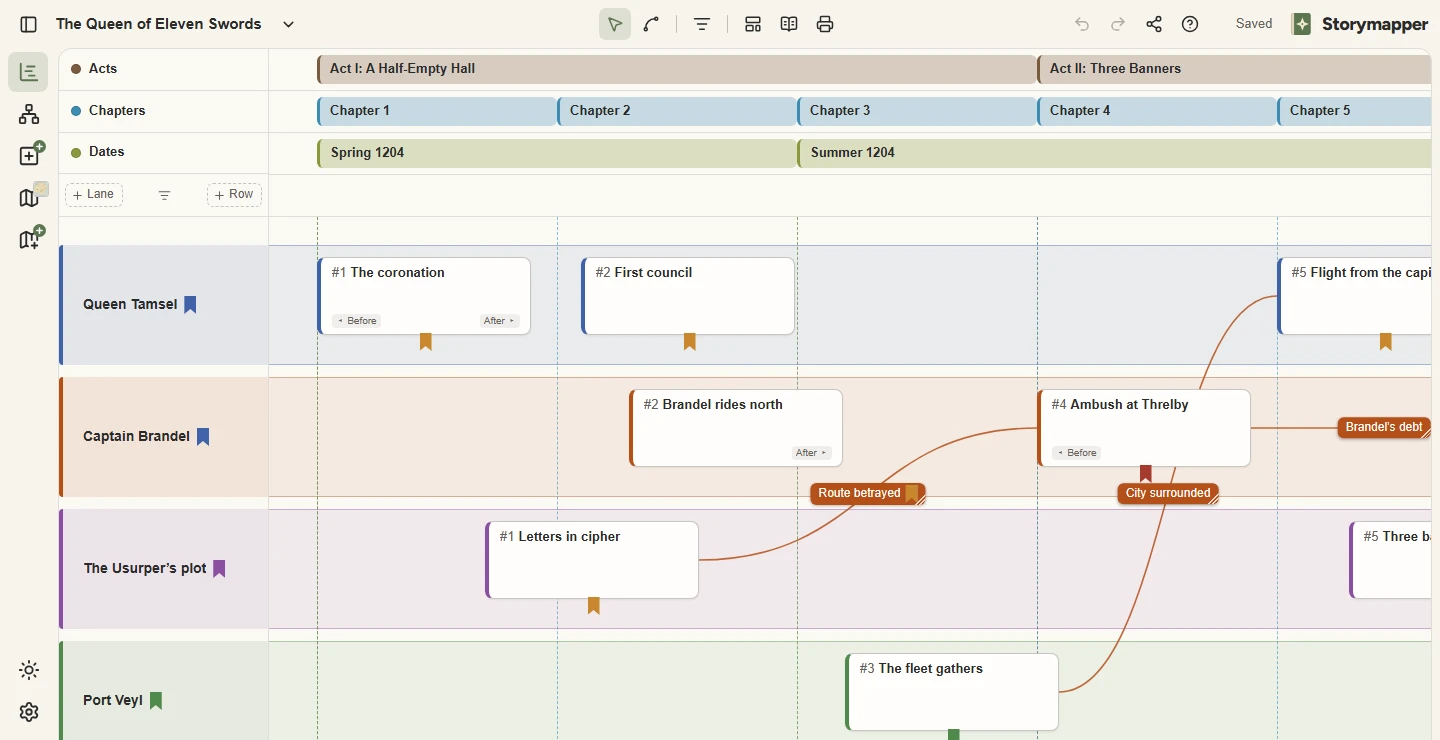
Lay every scene out in lanes for your characters, plotlines and places, under rows for acts, chapters and dates. Link cause to effect, and see the whole plot on one screen.
Then watch it unfold
At a glance
| Storymapper | Plottr | Aeon Timeline | Campfire | World Anvil | |
|---|---|---|---|---|---|
| Works in your browser | Yes | On the Pro plan | No (Mac, Windows, iPhone and iPad apps) | Yes, plus desktop and mobile apps | Yes |
| Free option | Yes, free forever | 30-day free trial | Free read-only viewer | Yes, with limits | Yes, with limits |
| Story timeline | Gantt-style: scenes across lanes for characters, storylines or locations | Timeline grid of plotlines and chapters | Detailed timeline with real dates, ages and relationships | Timeline module, including a Gantt view | Timelines |
| Maps | Upload your map; add scenes, journeys, territories, icons and drawings | — | — | Maps module with pins and nested maps | Interactive maps with markers and layers |
| Maps connected to the timeline | Press play and watch your story unfold across the map, at your chosen speed | — | — | — | Chronicles: select an event and the map moves to it; maps that change over time on higher paid tiers |
| Family trees and relationship charts | Relationships chart for family trees, chains of command and alliances. Press play and it changes with the story | Family Tree feature | Relationship view: a grid of which characters take part in which events | Relationships module: freestyle flowcharts and family trees | Family trees on paid memberships, plus organisation charts and diplomacy webs |
| Story structure templates | Seven, including the three-act structure and the Hero’s Journey | A large library | Yes, including the Hero’s Journey | Ten or more in the Timeline module, including the three-act structure | Plot templates, written as articles |
| Write your manuscript in it | No, it’s for planning | No, exports to Word and Scrivener | No, syncs with Scrivener | Yes | Yes |
“—” means I couldn’t find the feature when I last checked.
Storymapper
Storymapper is a planning tool with three parts: a Gantt-style timeline of your scenes, a map that plays your story back, and a relationships chart for family trees, chains of command and alliances. It only does those three things, but it does them well.
What it does well. The free plan is free forever, not a trial, and you don’t need a card to sign up. The map is animated: press play, and scenes, journeys and territories appear across your own map in story order. I couldn’t find another tool that plays a story back across your map like that. The relationships chart plays back too, so you can watch a family tree or an alliance change from chapter to chapter. You can send anyone a read-only link to a project, and they need no account to open it. It runs in your browser with nothing to install, and you can pick it up in minutes.
Where it falls short. You can’t write your manuscript in it. It doesn’t draw maps, so you need a map image from somewhere else. Story time is a simple left-to-right order, so it won’t work out ages or durations from real dates. It has seven story structure templates, where Plottr has a whole library. There is no wiki for your world, and no desktop or mobile app, so you need an internet connection. It’s also new and built by one person, so it does less than tools that have been around for years.
Plottr
Plottr is one of the best-known plotting tools, and for good reason. It has a large library of story structure templates and good support for planning a whole series, and it exports your outline to Word or Scrivener when you’re ready to draft. It’s polished and well established.
Plottr might suit you better if you want a large library of structure templates to choose from, you’re planning a long series, or you want a desktop app that works offline.
Storymapper might suit you better if you want a genuinely free plan rather than a trial, you want to work in your browser on any computer without paying for a higher tier, or you want maps alongside your timeline.
Aeon Timeline
Aeon Timeline is a serious timeline tool. It tracks real dates, durations, characters’ ages and the relationships between events, and it syncs with Scrivener. If your story depends on precise chronology, it’s hard to beat.
Aeon Timeline might suit you better if you need exact dates, ages and durations, you draft in Scrivener and want the two in sync, or you prefer a desktop app you buy and own.
Storymapper might suit you better if you think in chapters and scenes rather than exact dates, you want something you can pick up in minutes, or you want to see your story play out on a map.
Storymapper as a Aeon Timeline alternative: the two side by side
Campfire
Campfire is an all-in-one writing and worldbuilding app, made up of modules for everything from your manuscript to characters, magic systems, species, maps and timelines. You pay only for the modules you want, and it runs in the browser, on desktop and on mobile.
Campfire might suit you better if you want to plan and write your book in one place, you want detailed encyclopedia-style worldbuilding, or you want a mobile app.
Storymapper might suit you better if you want a focused tool for your timeline, your map and your cast, one simple price instead of choosing modules, or a map and a relationships chart that animate your story as you press play.
World Anvil
World Anvil is a huge worldbuilding platform: wiki-style articles, interactive maps, timelines, family trees, campaign management for game masters, and the option to publish your world for readers or players. Its Chronicles feature links timeline events to an interactive map.
World Anvil might suit you better if you’re building a full encyclopedia of your world, you want to publish it as a public site for players or readers, or you run tabletop campaigns and want everything in one place.
Storymapper might suit you better if you want to plan the story (scenes, plotlines, chapters) rather than build a wiki, you want to be up and running in minutes, or you want to watch journeys, changing territories and shifting alliances animate as the story plays.
Storymapper as a World Anvil alternative: the two side by side
Spreadsheets
This is where I started. Spreadsheets are free, flexible, and you probably already know how to use one. If yours works for you, keep using it.
They start to struggle when a scene needs more than one cell of notes, when you want to drag scenes around without breaking everything, or when you want images, colour-coded labels or a map. Storymapper is built for exactly the moment your spreadsheet starts to creak.
A note on maps
Storymapper doesn’t draw maps for you: you upload an image. Make your map in a dedicated map-maker such as Inkarnate or Wonderdraft, or draw it and take a picture or scan it in. Then bring it into Storymapper to plot your story across it.
Questions
- Is Storymapper really free?
- Yes. The core features are free forever, and you don’t need a card to sign up. Storymapper Plus (£3 a month or £30 a year) adds unlimited projects, unlimited maps per project, unlimited relationship charts per project, images on your scenes, your own icons on your maps, your own background image for the work area and 2 GB of image storage.
- Do I need to install anything?
- No. Storymapper runs in your web browser. It works best on a laptop or desktop screen.
- Can I get my work out?
- Yes. You can export your projects at any time. You can also save the map and the Relationships chart as pictures, print the timeline or save it as a PDF, and share a read-only link.
- Does Storymapper use AI?
- No. There are no AI features, and your writing is never used to train AI or sold to anyone.
- Who’s behind it?
- A UK-based writer who built Storymapper to plan their own stories. It’s a one-person project, so feedback goes straight to the person building it.
Plottr, Aeon Timeline, Campfire and World Anvil are trademarks of their respective owners. Storymapper is an independent product and isn’t affiliated with or endorsed by any of them.