Plottr alternatives: a free story timeline with maps
Plottr is one of the best-known plotting tools, and for good reason. It has a large library of story structure templates and good support for planning a whole series, and it exports your outline to Word or Scrivener when you’re ready to draft.
Storymapper is a different kind of tool. It has a Gantt-style timeline of your scenes, a map that plays your story back and a relationships chart for your cast, and it only does those three things. This page sets the two side by side, so you can tell quickly which one suits you.
Last checked: October 2026. Features and prices change. If anything here is out of date, let me know at hello@storymapper.co.uk and I’ll fix it.
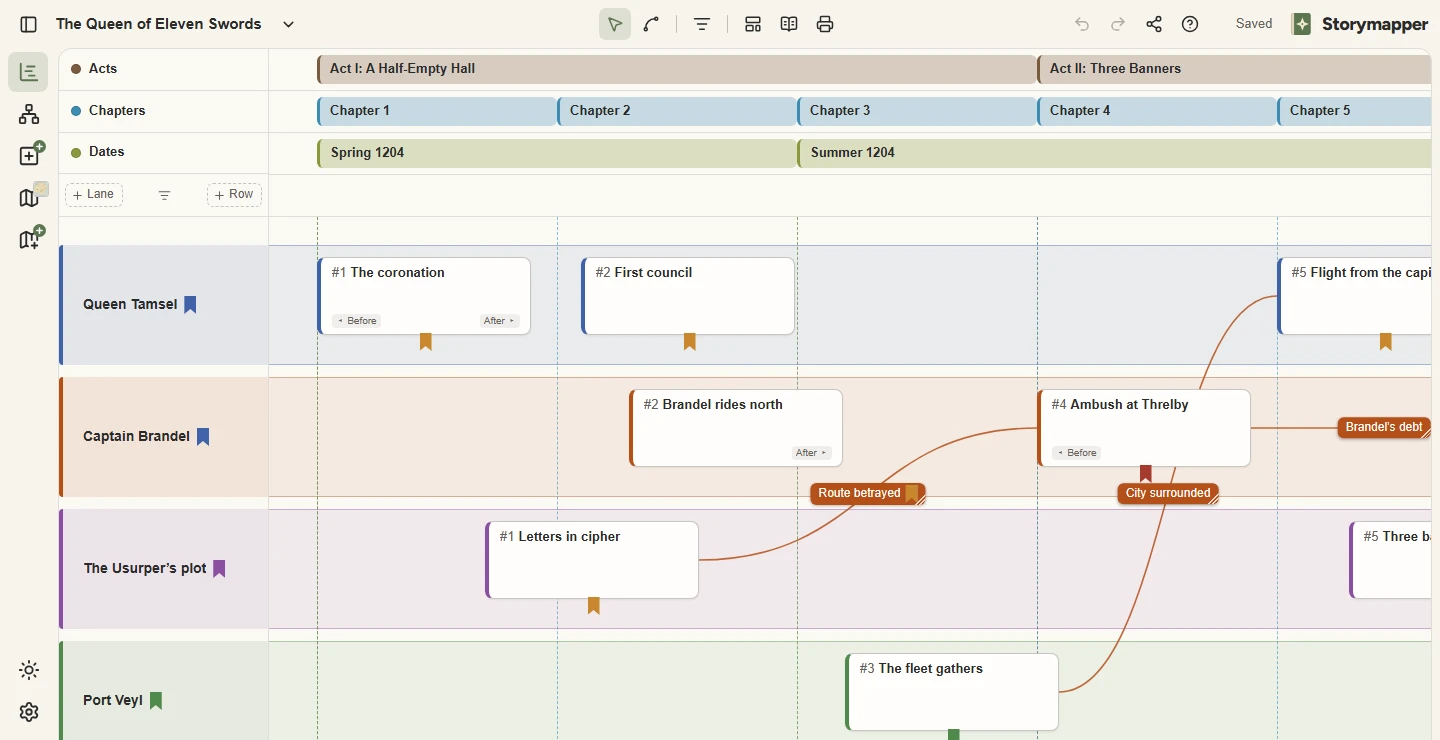
See your story three ways
Why look for a Plottr alternative?
- Plottr has a 30-day free trial, and after that you pay. Storymapper has a free plan with no time limit.
- Working in a browser needs Plottr Pro, which was $99 a year when I last checked. The standard plan, at $60 a year, is the desktop app for Windows and Mac. Storymapper runs in the browser on both of its plans.
- Plottr has no maps. In Storymapper you pin scenes to your own map, draw journeys and territories, and play the story back across it.
Storymapper vs Plottr at a glance
| Storymapper | Plottr | |
|---|---|---|
| Works in your browser | Yes | On the Pro plan |
| Free option | Yes, free forever | 30-day free trial |
| Story timeline | Gantt-style: scenes across lanes for characters, storylines or locations | Timeline grid of plotlines and chapters |
| Maps | Upload your map; add scenes, journeys, territories, icons and drawings | — |
| Maps connected to the timeline | Press play and watch your story unfold across the map, at your chosen speed | — |
| Family trees and relationship charts | Relationships chart for family trees, chains of command and alliances. Press play and it changes with the story | Family Tree feature |
| Story structure templates | Seven, including the three-act structure and the Hero’s Journey | A large library |
| Write your manuscript in it | No, it’s for planning | No, exports to Word and Scrivener |
| Price | Free. Storymapper Plus is £3 a month or £30 a year | $60 a year for the desktop app, or $99 a year for Pro with browser access. Lifetime licences from $150 |
“—” means I couldn’t find the feature when I last checked.
When Plottr is the better choice
Plottr might suit you better if you want a large library of structure templates to choose from, are planning a long series or want a desktop app that works offline.
When Storymapper is the better choice
Storymapper might suit you better if you want a genuinely free plan rather than a trial, want to work in your browser on any computer without paying for a higher tier or want maps alongside your timeline.
What Storymapper doesn’t do
You can’t write your manuscript in it. It doesn’t draw maps, so you need a map image from somewhere else. Story time is a simple left-to-right order, so it won’t work out ages or durations from real dates. It has seven story structure templates and not a whole library. There is no wiki for your world, and no desktop or mobile app, so you need an internet connection. It’s also new and built by one person, so it does less than tools that have been around for years.
Other Plottr alternatives
Storymapper won’t be the right answer for everyone. These are worth a look too.
- Aeon Timeline. Detailed timelines with real dates, ages and durations, synced with Scrivener. Storymapper compared with Aeon Timeline.
- Campfire. All-in-one writing and worldbuilding, sold by the module, with a manuscript editor. Storymapper compared with Campfire.
- World Anvil. A worldbuilding wiki with interactive maps, timelines and campaign tools. Storymapper compared with World Anvil.
- Scrivener. A long-established writing app for drafting a manuscript, with a corkboard and an outliner for planning it.
- A spreadsheet. Free, flexible, and you probably already know how to use one. It starts to struggle when a scene needs more than one cell of notes, or when you want a map.
For all of them in one table, see how Storymapper compares.
Questions
- Is there a free alternative to Plottr?
- Yes. Storymapper’s Free plan has no time limit and needs no card. It includes the timeline, map playback, the relationships chart and share links, for up to 4 projects with one map and one relationships chart in each.
- Can I import my Plottr file into Storymapper?
- No. Storymapper can’t read Plottr files, so you would add your scenes again by hand.
- Does Storymapper have story structure templates like Plottr?
- It has seven: the three-act structure, the Hero’s Journey, a fifteen-beat sheet, the seven-point structure, the story circle, Freytag’s pyramid and Kishōtenketsu. Each one drops onto your timeline as a row of beats. Plottr has a far larger library, so if templates are the main thing you want, Plottr is the better choice.
- Does Storymapper work offline?
- No. Storymapper runs in your web browser and needs an internet connection. Plottr’s desktop app works offline.
Plottr and the other product names on this page are trademarks of their respective owners. Storymapper is an independent product and isn’t affiliated with or endorsed by any of them.